Back to Software Engineering projects

DandyPicker
Work and personal Claude Desktop, open at once
- Role
- Designer and developer
- Tools
- C#, .NET 10, Avalonia, Electron
- Company
- Personal project
- Year
- 2026
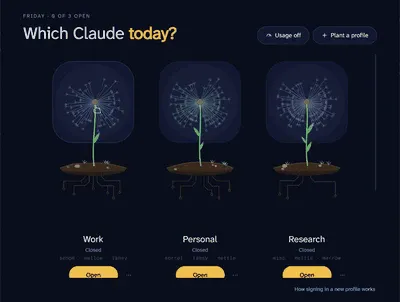
DandyPicker runs Claude Desktop with more than one account at the same time, for example work and personal side by side. Claude Desktop is an Electron app, and starting it with its own --user-data-dir gives that copy its own sign in, chats and settings, and its own single instance lock. DandyPicker keeps a list of these profiles and launches each one with the right folder. It is named for the Claude logo looking like a dandelion.
Every profile is a plant. Each one grows as a dandelion on a stem, from a patch of soil with circuit board roots, and the plants grow in one after another when the window opens. A running profile’s frame glows, and white dots run down its roots and leave as little packets of its own bits. When it closes, its seeds wilt toward the ground and its leaves fold up. Click a plant to change its name, color, waviness, stem bend and seed tips.
The seeds are data. Starting just clockwise of the stem, each seed is one of four lengths, so four seeds spell one byte of the profile’s name and folder. The flower can be read back like a QR code. The same text also hashes to three seed words that name the flower, pick its default color, and seed its soil, pebbles and roots, so no two profiles grow alike.
Plan usage, off by default. An opt in mode shows each profile’s session and weekly usage as two rings around its flower, with the reset times under its name. It explains what it does before it turns on, and sends each profile’s sign in token only to Anthropic’s own usage address.
Signing in. Windows always sends Claude’s sign in links to the default window, so DandyPicker watches the clipboard for a copied sign in link and offers a button to send it to the right running profile.
Videos
Customize a plant

Seeds and name

Media
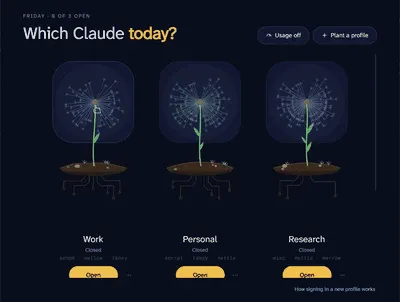
Which Claude today? Each profile is a dandelion with three seed words under its name